Fresh items every 15 days, and 1,500 Piktos to get started
Many of you write to ask for more things to collect and to give to your friends. Message received: the shop will now change regularly, and we're spoiling new players while we're at it. Here's everything that changes.
Fresh items every 15 days
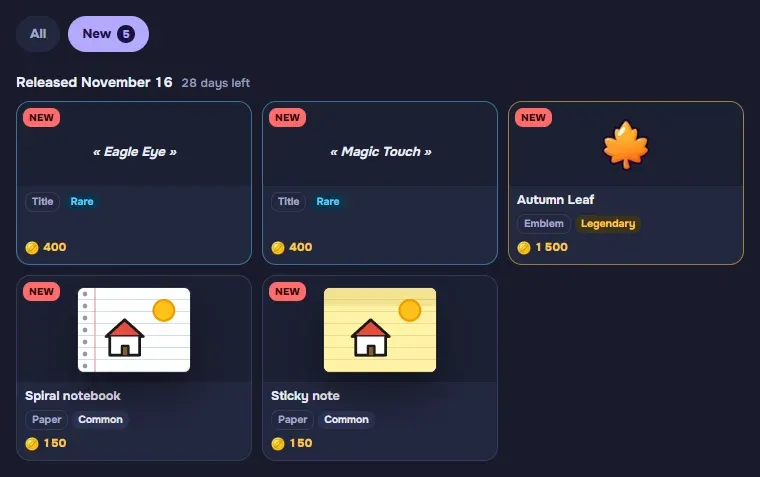
The shop now has a New tab. About every 15 days, new items arrive there: an item stays « new » for 4 weeks, and the tab keeps the last two drops. An item you already own stays on display: you can still give it to a friend.
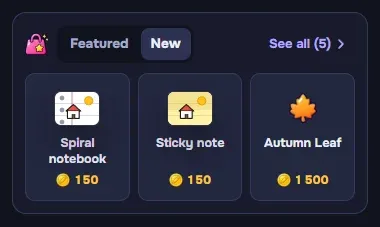
- On the home screen, the « Featured » block has a second tab: New. A pink dot tells you a drop has arrived, and « See all » opens the shop tab directly.
- For the season: when holiday items come back (Christmas, New Year, Valentine's Day…), they also show up in the New tab.
- Top 50 rewards, when they reach the shop, count as new items too.
- Mascots are back among the « Featured » items.
First drop this Monday, November 16: a drawing sheet, the Spiral notebook, a background, the Cozy Café, a title, « Eagle Eye », and an emblem, the Shooting Star. What comes next? Our lips are sealed: keep an eye on the pink dot.
Up to 1,500 Piktos to get started
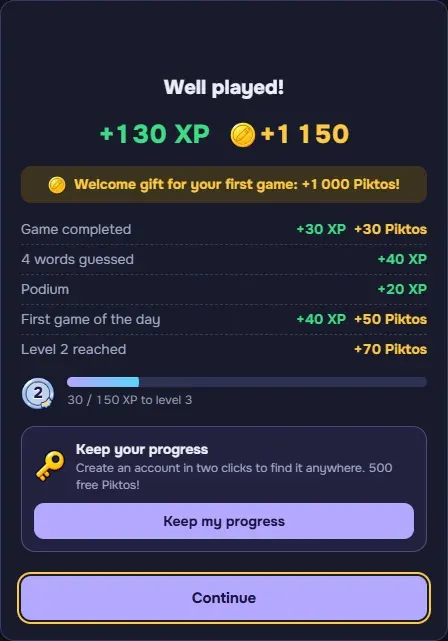
- 1,000 Piktos at the end of your very first game. Enough to treat yourself to a mascot or a nice frame right away.
- 500 Piktos when you create your account on pikto.fun (instead of 100). Your account keeps your progress on all your devices.
The end-of-game window now details all your earnings: the Piktos from the game, from your first game of the day, from each level up, and « XP » next to every green amount. The total at the top is still the sum of the lines.
PiktoBot and friends have a new face
PiktoBot and friends have a new, more detailed portrait, each with their own style: PiktoTurbo's lightning bolt, PiktoMimi's bow, Grandma Cerise's cherries, PiktoDiva's crown…
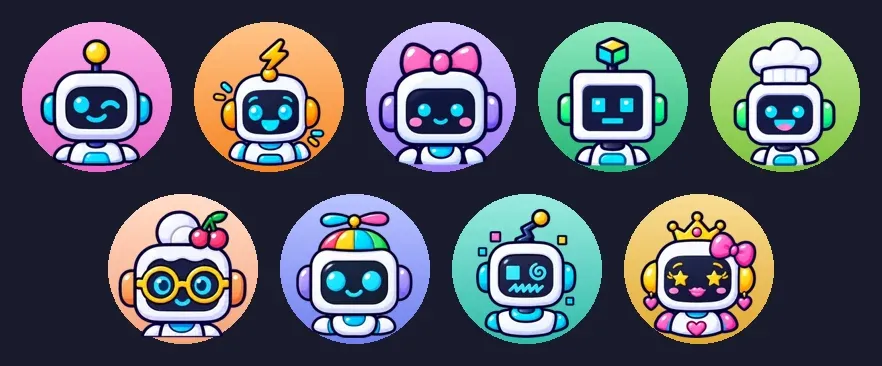
And best of all, they react:
- When a bot draws, its portrait stands next to the sheet, like a player's mascot: focused during the turn, delighted every time someone guesses, panicking if nobody does. Tap it to open its profile.
- On the podium, it stands on its step, all happy if it won.
- On its profile, its portrait comes to life.

International games for everyone
After several weeks of testing, international games are out of beta:
- Quick Play is international by default: you draw and guess in your language, and every message is translated. Rather play only with players who speak your language? Tap « Only in English » under the button.
- When you create a custom game, choose whether it's played in your language or internationally.
- You can watch an international game in progress, in your language, before joining it.
More comfortable on tablets and phones
- The keyboard closes after each guess on touch screens: the sheet stays visible while you think. Tap the field to type again.
- A cross to close the menus that open from the bottom of the screen (message actions, picking a bot).
- On iPad, the game fits CrazyGames' small windows better, and a two-finger zoom no longer distorts the game screen.
- On CrazyGames, your progress is better kept from one visit to the next, even when your browser forgets everything.
- Your very first game on a phone or tablet is played with easier bots, while you find your bearings.
The « Skip » button, closer to you
The « Skip » button now sits right above the answer field, on computers and phones alike: no more hunting for it when a drawing is impossible to guess.
A more accurate bucket
- A light grey rectangle (or one in any other very pale color) now stops the paint: the bucket no longer fills the whole sheet.
- Between two circles, even where they come very close, the bucket now fills the whole space.
- On a colored sheet (Light Kraft, Blueprint…), a white line stops the paint, and you can fill it too.
Also in this update
- Your profile stats now add up your games across all your devices.
- The Quick Play button shows how many players are online, for both ways of playing.
Grab your pencils! Start a game and open the New tab on Monday.